
Thanks so much for stopping by! I hope you'll engage by leaving comments, be encouraged, occasionally chuckle at discovered quirkiness, and even be inspired in faith. Please use the button to subscribe via email so you won't miss a post!
Peoplebrowsr.com
If you're looking for an all-in-one social media browser that combines the two most popular services - Facebook and Twitter, you may have finally found a great solution. Better than Tweetdeck. More full featured than Streamy. At home on whatever computer you choose... PeopleBrowsr.

I just wrote a review of streamy.com last month. It’s a service that gives you Tweetdeck-like functions in a beautiful website. I was so impressed, I set it to my homepage.
It didn’t stay on my radar screen long.
Enter peoplebrowsr.com.
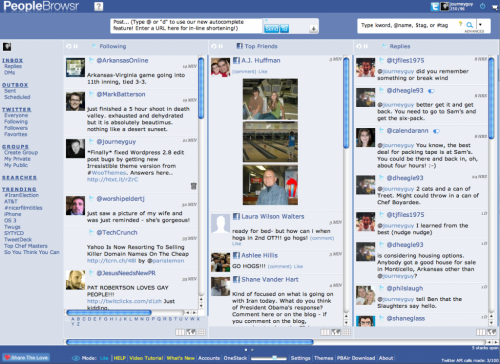
You’ll notice quickly that it has the ability to display as many columns as you want. You can shrink the column width or expand it. From there on it, it’s just downright amazing/fun to discover all that this site (and its corresponding Adobe Air app) can do. Everything is mouse-able.
 I particularly love the ability to view my Twitter contacts’ “@” replies as a threaded conversation. That’s extremely handy for figuring what in the world is going on in your Twitterverse. Sure beats scrolling back a mile to figure out who said what.
Hovering over any contact photo gives you a plethora of options to respond to your contacts. Shift-clicking on a status update allows you do something pretty nifty… create a Tag Group.
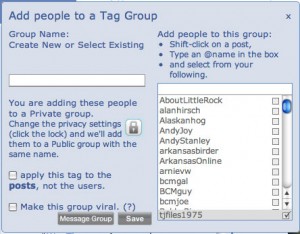 The Adobe Air app has all the same features of the web site. One of the amazing things you’ll find about peoplebrowsr is that after many minutes exploring, you’ll discover that there are different levels of use for different levels of users. I typically use the Lite Mode, but there is also Advanced and Business Modes. Very nice.
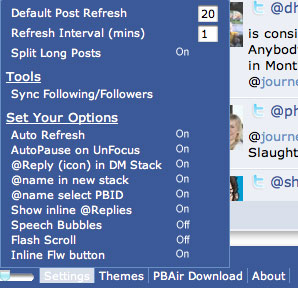 The Settings are also a great feature at the bottom of the window. You have all kinds of options, and you can even change settings per each column.
If you’re looking for an all-in-one social media browser that combines the two most popular services – Facebook and Twitter, you may have finally found a great solution. Better than Tweetdeck. More full featured than Streamy. At home on whatever computer you choose… PeopleBrowsr.



I’ve been using it for a little over a week. I love the fact you can access different Twitter accounts from it as well.
Wonderful tool!