Browsing articles tagged with " iPad"
Aug 27, 2011

Ode to Steve

I was recently called a “Mac troll” by a friend. It happened after I posted this link to my “Geeks” circle on Google+. I don’t know if he’s aware that he’s in my geek circle. He should be proud.

If it wasn’t enough that we survived an earthquake and a massive hurricane called Irene this weekend, Steve Jobs announced his resignation as CEO of Apple. The world really is coming to an end.

Me and Steve/Apple

I grew up when personal computers were not yet called PCs. Chris and Tony Franzetti in my neighborhood had a TRS-80, and I was amazed at how they could type endless lines of  code into it and produce a digitized drawing of a seal. Such was the usefulness of computers in the early 80s for the average teenager. We never had a computer in my house.

I was active on the yearbook and newspaper staffs at Pulaski Academy, and we had a monstrous typesetter that Mark Dalrymple alone knew how to coax wet, chemical-smelling strips of beautiful headlines and type out of. We’d hang the productions from a clothesline to dry before cutting them and pasting them into place. Then we’d take them to a printer.

When I went to college in 1986, I didn’t own a typewriter. When papers were due, I’d go to the computer lab or, more likely (because so many of us were unfamiliar with computers), I borrowed a typewriter from someone on the hall in my dorm. It was a glorious day when Mark Christie became my roommate in 3rd floor Daniel South. He owned a typewriter with automatic correction!

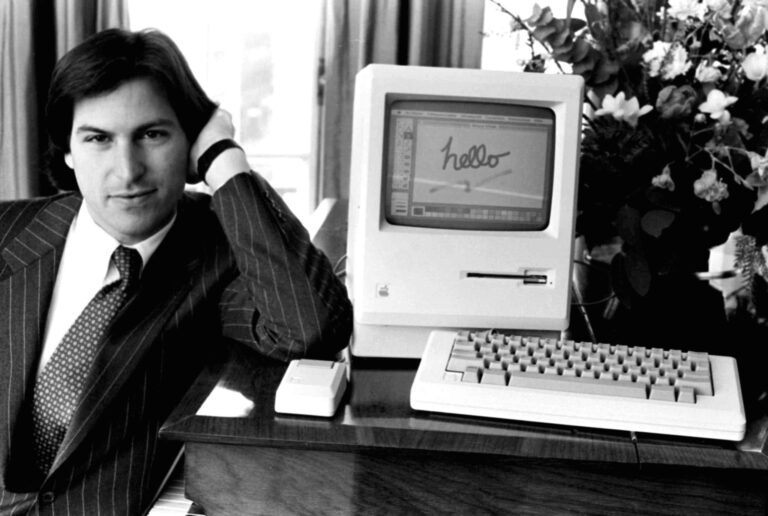
In 1986ish, Ouachita Baptist University’s journalism department purchased a slew of Mac Pluses, and Dr. Downs, the department head, challenged us to produce a “camera-ready” yearbook. What does that mean, we wondered? So began my love affair with Apple and the Macintosh.

My junior year, Mitch Bettis and I started a company called AdVantage Advertising in Arkadelphia, Arkansas. We got a small business loan from Elk Horn Bank and bought a Laserprinter and some Mac Pluses. We were early surfers of the desktop publishing wave. We had a blast before selling the company, and each of us moved on to grad schools.

My first personal Mac was a Mac LC. It looked like a grey pizza box. Little did I know that we were living in the era of Apple’s Dark Ages. Steve Jobs had left after a power struggle with CEO John Sculley in 1985. Sculley unimaginatively led Apple to produce dozens of bland, generic beige boxes. The only saving grace was the System 7 operating system within each. Steve returned to the company in 1997, and so began the meteoric rise of Apple with the release in 1998 of the first iMacs – a colorful line of bubbly computers.

Steve’s leadership transformed Apple. It went toe to toe with Microsoft, and Mac users weathered the taunts, abuse, ridicule about Macs not “being a real computer.” I remember the days when I began in campus ministry. A few years after I began, the Arkansas Baptist State Convention allowed me to get a Powerbook G3 (333, Lombard series). It was glorious, and it continued to run circles around all the homemade computers that PC students (PC now referred to anything with Windows installed on it and was known as a “Piece of Crap.”) would slave over. They’d spend hours piecing together the innards and then more hours troubleshooting their creations. All the while, the Mac just worked.

Since then, I’ve been through iBooks, Macbooks, a PowerMac G5, a 17″ Powerbook G4, 12″ Powerbook G4, iMacs G4, G5, and Core 2 Duos (Carolyn’s computer now is a iMac 2.0ghz) and the baby I’m now using – a 15″ MacBook Pro Intel Core 2 Duo 2.66ghz. On top of that, I’ve bought and sold, literally dozens of iPods (off of Ebay to raise money for Christmases).

When I resigned from campus ministry in 2003 to start a church on faith and obedience, I turned to graphic design to help put cereal in the cupboard. My first purchase was that PowerMac G5 I referred to earlier (and you can watch the video below.)

Then in June 2007, Apple entered a new era. The iPhone was announced. I wrote a blog entry in December 2006 called “Apple positioning to revolutionize the cellular industry” and received an enormous amount of ribbing and condescension from PC users (surprise!) and even a friend in Monticello who owned a cell phone store. He predicted that the iPhone would be a bust.

I’ve loved riding this fanboy wave. But the iPhone was beyond my reach. It retailed at $599 for the 8gb version. I prepared myself to not be an early adopter… Imagine my sheer delight when Carolyn presented me with an iPhone in the parking lot of Mazzio’s in Monticello, Arkansas! Mom and Dad had lovingly ponied up the money to purchase one for me. Then Carolyn and Sam had stood in line at the local AT&T store to get one. (Read the exuberant post  and watch the video here.) Since then, I’ve bought and sold a few iPhones on Ebay to make enough money to not have to pay out of pocket for the subsequent iPhone 3, 3GS and iPhone 4. I’ve also owned the first iPad and now use the iPad 2 (and bought and sold a couple of others during the popularity wave).

If you’re still reading, you’re either fascinated with how I came to be an Apple fanboy, or you’re a fanboy or girl yourself. I’d love to hear your stories.

When Steve resigned this week (For all true Apple lovers, he’s not Mr. Jobs. He’s Steve. We’re on a first name basis with him.), my heart dropped just a little. At the same moment, it soared. For those of us who’ve walked this technological path of discovery with Apple, we’re proud of that. We’ve been through it all. I can remember smug looks from Dell users when I pulled my trusty Powerbook out of a case in a coffee shop. I’ve heard, “Can you actually get any work done on that?” I’ve been there. In the last 5-6 years, however, the tide has completely turned, and it’s a sense of camaraderie that one feels when you notice several Macbooks, iPads or the like scattered in a conference or classroom.

Here are some observations about Apple and some thanks to Steve:

  • Apple is both a hardware, firmware and software experience. That is a huge differentiation from what any other company has been able to do. Apple pays as much attention to design and curves as it does to system functionality as it does to its software. It’s a seamless experience that allows every Apple product to “just work.”
  • I have never had a problem with computer viruses in the 25 years I’ve used Mac products.
  • All the other tech companies and OS offerings today (Google, Android, WebOS, etc.) have failed to produce the cohesive package that Apple can offer. For the most part (and there are declining exceptions) they are licensing operating systems and putting them in hardware wrappers made by other companies. It’s hard to control quality and the user experience that way.
  • Mac products retain an incredible resale value. That’s how I’ve been able to stay on top of the new release curve and become an early adopter of new products. Many times, I’ve actually made money on a Mac that I bought from Ebay and then resold for just a little more.
  • I am not saying that Macs are flawless. I have had issues. However, Apple customer service is simply amazing. However, with all the Macs I’ve owned and resold, I can tell you that the times I’ve had to call (and a few times cajole) 1-800-SOS-APPLE, that they’ve come through on every occasion that they should. Even a few occasions where I admitted they had absolutely no responsibility to help me, they’ve come through and helped me out. That creates a loyal customer. Period. I sometimes wonder whether Android fans or Googlers will remain fans when they discover that Google/Android can’t help them with their hardware?
  • Apple products, including their computers, are just fun to use. The video was created in 2003, on the PowerMac G5 whose arrival I was celebrating…

I could go on, but I suspect there are some readers whose stomachs are turning. I’m sorry. If this makes you uncomfortable, go defrag your hard drive or maybe replace your motherboard.


And to Steve… thanks. Truly. I have an immense amount of respect for you. You’ve been able to lead the world in technology, besting the big boys time and time again. Your company has singlehandedly revolutionized our personal technology experience. You took on the music industry and put tunes in our pockets. You changed the cellular industry. I imagine in the next year that your vision will also transform and reshape the video industry – dethroning cable and satellite companies and putting our TV and movies into the common users hands when we want it,affordably, and in a package that has the “wow” factor.

From a bruised Apple fanboy to one the visionaries who started it all, it’s been an amazing ride. I’m already plotting how to get a newer Macbook Pro and the iPhone 5 (although I haven’t yet upgraded to Lion). I still love the line you used to get John Sculley aboard at Apple from Pepsi: “Do you want to sell sugar water for the rest of your life or come with me and change the world?” Although John didn’t work out vision-wise, Apple did grow under his leadership. And you have changed the world with your products, vision and leadership.

This week, in spite of an earthquake and a hurricane, all i’s have been on you, Steve. As you make this transition, my sincere prayers are with you – for your strength, health and healing. Also, because none of us truly knows our remaining days, I am praying for you to become a joyful follower of Jesus Christ. If I had an opportunity to sit down with you tonight, I’d challenge you like you challenged John so many years ago, “Do you want to sell glass and circuits for the rest of your life, or join me in following the One who has changed the world?”


In the end, when it comes down to it, we all have earthly loves. One of mine is all things Apple. But that love pales in comparison the love and gratitude I’ve found in following the Creator of the first apple. Mankind’s misuse of that apple didn’t turn out so well. I hope that my use of Apples in these days always points to and glorifies the grace and love of Jesus Christ.

Jul 22, 2010

Review: CrazyOnDigital Folio Case for iPad

It’s not too often that I review a product, and this will be short and sweet, but after plunking down a wad of dough for our iPad, I promptly began puttering around for some iPad protection. One thing you’ll discover quickly is that most of the cases that Best Buy and retail stores sell are, well, sorry. And expensive.

When I found the CrazyOnDigital Folio on Amazon for only $20, I was pretty skeptical. “That’s cheaper than most iPhone cases! How can it be any good?”

I’m a review reader, though, and after skimming the reviews of the case, I opted to get one. Amazon has a great returns policy, and I took advantage of our Amazon Prime membership for free 2-day shipping.

Short story: We love it!

It’s truly a quality, attractive case. I also love that it has utility pockets. The fold-over design allows you to set it up on your lap, or do give it just the right tilt angle on your desk to type on your iPad effectively.

What are you waiting on? Go get it.

Jul 12, 2010

iPad update

It’s been about three weeks since we got our iPad, and I thought I’d share what we’re continuing to learn from it and our use of it. It really is in the process of revolutionizing how/when/where I digest information and media.

  1. It’s all about the apps. Even more so than the iPhone. Yes, one can argue all you want that “it’s just a big iPhone/iPod Touch,” but that’s not a valid argument. For starters, there are apps for the iPad that are not available for those devices. Second, many apps that are available for both have been rewritten and redesigned for the iPad. And yes, they are ultimately better.
  2. The screen is gorgeous. Yes, I know my Macbook Pro screen is similar or better. But I don’t hold my Macbook Pro screen at the same viewing distance as my iPad. Watching movies via Netflix or iTunes with an iPad is stunning. You feel immersed in the story. The screen also makes working on the iPad completely enjoyable.
  3. Reading books on the iPad is truly doable. I’ve been a skeptic of eBooks for a long time. I don’t know that I’ll ever get over my love affair with a bound volume. Plus, I doubt I’ll take my iPad into the bath tub with me. (sorry for the mental picture) There are several eBook apps that are simply brilliant, and many give you the option of adjusting the screen tint so that you feel like you’re actually viewing a printed page.
  4. The iOS is pretty stinking amazing. I wrote in my journal the other day that it’s actually liberating for me. I’m a huge multitasker, and too often I’m guilty of bouncing through screen real estate from one program to another, one project to another and losing myself in the day. The way the iOS is structured has compelled me to think linearly, and it has been refreshing. I don’t have dozens of windows open in the background. I can’t see what’s going on behind the scenes while I’m in an app without exiting. No Growl notices. Etc. I hope that the upcoming iOS 4 update for the iPad doesn’t ruin that wonderful simplicity of focus for me.
  5. Perfect for communication. Skype works flawlessly, and thus far, we haven’t used the 3G capabilities of the iPad. From email to Twitter, the iPad is wonderful for connecting.
  6. MobileMe. It just keeps getting better. But with Apple’s cloud service, our phones, our computers and the iPad are all simultaneously synced with our contacts, calendars, web bookmarks, etc. Sigh.

A complaint about apps

One complaint I have is that apps that are available on both iPhone and iPad platforms generally require two different purchases. I can’t gripe too much because the iPad apps are better (see #1 above). However, with the App Stores not allowing you to preview software, it’s like shooting in the dark as to whether an app will be good or not. Since apps are more expensive for the iPad in general than the iPhone, that’s not a risk I take. Rather, I opted to immediately jailbreak our iPad, and I use Installous to preview apps before I buy them. Those apps that are good, I buy; those that aren’t, I delete. There needs to be an app store process like renting movies from iTunes which gives you 1-3 days with an app before it “times out.”

Apps to “check out”

The eBook apps continue to turn heads (and pages). In addition to Apple’s own iBooks, there are stellar apps from Barnes & Noble, Amazon Kindle, and Borders. My favorite (and the one that is consistently cheaper) is the Kindle app. It’s truly a work of art, and it makes buying an actual Kindle moot. Why buy a Kindle which only does eBooks when you can buy an iPad with a wonderful Kindle app? (or the Nook for that matter)

Twapps

The following apps are ones that I’m currently comparing for the ultimate honor of being my official Twitter app on the iPad:

  • Echofon Pro
  • Osfooro
  • Twittelator

Each have pros and cons, but I like how Echofon syncs my read/unread tweets with Echofon for the iPhone and for the desktop. Osfoora is probably the most well-designed and graphically appealing, but I wish it had another theme option besides the dark one.

Big Facebook Fail

I could not believe Facebook didn’t have an iPad app. I guess they’re trying to push you to simply using the Facebook site in Safari? However, I’ve loved the simplicity and distractionlessness of the iPhone Facebook app. It’s a definite niche and a plus. At this point, there’s an absolutely gorgeous app called Sobees Lite that renders Facebook like a magazine. I heartily recommend it, but it lacks many of the iPhone apps functionality. The Facebook hole on the iPad at present is just begging to be filled by someone.

Another iPhone-iPad transition fail is Fox News’ app. Cmon, guys!

It’s Raining, It’s Pouring

I prefer Accuweather over the Weather Channel Max. Accuweather may look too simple, but everything is clickable, and it has a nice graphic interface to get to maps, video reports, etc. The free WC app is that way because it supports annoying popup ads.

Feed Me

If you’re still surfing to your favorite blogs one at a time, you are so… late 90s. Get a feed reader and use it today. I’ve chosen Google Reader simply because Google owns our birthright, and I wanted to be sure I was in their will. It also syncs with everything but your kitchen, uh, nevermind. You get the picture.

I’ve used Reeder on my iPhone for quite a while, and its iPad app has the best rating. However, I hate – with a passion – its start screen. It’s essentially little stacks of paper representing the different folders that I’ve sorted my blog reads into. I much prefer how the iPhone app lists them in the left column. I was pleased to discover that MobileRSS Feed Reader has a much better layout initially.

However… Reeder just seems to have a smoother feel to it functionally and aesthetics-wise than does MobileRSS. I’m torn between the two. Everytime I fire up Reeder and get those obnoxious and unhelpful little stacks, I get fired up. But when I attempt to use the other exclusively I feel like I’m missing a long lost friend.

Other Apps I Like & Use

  • Words with Friends HD (was there really a need to say this?)
  • Taska – the best productivity app I’ve found on the iPad. Beats Things, ToDo and others. Like that it syncs with ToodleDo. I wish 2Do had an iPad app because that’s what I was using on the iPhone.
  • Chronicle – for journaling, notetaking
  • News apps: Fox News (iPhone version), NYT Editor’s Choice (I can’t help it for now; it’s beautiful), Early Edition, USA Today
  • Camerabag – wonderful photo editor
  • Bible apps: ESV Bible (great!), YouVersion Bible (super!), OliveTree Bible Reader (it has some great free resources, among which are a downloadable, searchable and indexed archive of all of John Piper’s sermons)
  • ContactsJournal – a pretty cool way of keeping notes for those who have a large contact list; great for organizational leaders who need to remember conversations and news about members or volunteers
  • Netflix and ABC Player
  • DC Comics and Marvel Comics - I was a comic book collector nerd forever. In reading a few stunningly gorgeous issues on these apps, the inner nerd is clawing to get back out.
  • Calendar – yes, the stock iCal app for the iPad is just, well, perfect. Thank you, Apple.
  • TwentyThree – a way cool geo social network consolidator. Great for digital stalking. And beautiful. Check out the pic below.

Recommendations to Steve

Here’s what I would do to improve upon the iPad:

  1. Multiple users. With OS X, the ability to create user accounts is wonderful and allows families to share one computer without messing up the settings, emails, and creative personalizations. Currently, the iPad is a little hard to use between multiple folks. It’s not like an iPhone that is mine. The iPad, I would imagine in many settings and households, is shared.
  2. A camera. Yes, I’m an early adopter, and no, I don’t mind that the first iPad didn’t have one. But bring it on!
  3. Sortable options in the App Store. When I do a search for “Twitter” to check out Twitter apps, I want to be able to sort the results by price, by rating and by release date. Having to scroll through windows by clicking on arrows seems very Windowish. Give us a list view or something.
  4. Quit fighting jailbreakers. They improve your product significantly. Or if you just fight with them for the free media attention, then you’re still a genius.
  5. Put a little gap in the case somewhere so that if you cover it with your finger, the person to the right of you will lose all cellphone signal.

Apps We Need

  • A texting app that allows you to receive texts sent to your cell phone and then allows you to send through that account… over WIFI. There are numerous texting apps that require you to create a new virtual number, and those are nice, but I’d really like to get my texts on my iPad – without 3G.
  • eBook Low Price. An app that consolidates the prices among all the big eBook apps and shows you which app/vendor has the cheapest price for that eBook. I would imagine that clicking on that low price automagically launches the corresponding eBook app and brings you to the purchase page for that book.

What about you? What’s been your iPad experience? How has it changed or is it changing how you relate with news, media and communication? Apps you like or want to see?

About

Notes from the Trail
The Personal Blog of Jeff Noble
Info: From the misty hills of Virginia, "Notes from the Trail" seeks to encourage you on your journey. Written by a graphic designer-pastor, this blog is a blend of humor, insight, and faith discovery.

Life Shots

Just another day with @codydavenport at the Lancaster House. Nothing new or unusual.Family: a key to laughter@adelynkay may be obsessed.Wifey lost fight with grill.Almost there...Love Southwest Airlines!
Feeling sweet? Copy this number: 6058013378446529, and then reload my Starbucks card here!

Lifestream

Book recommendations, book reviews, quotes, book clubs, book trivia, book lists

UserOnline

1 User Browsing This Page.
Users: 1 Guest

Social Media